
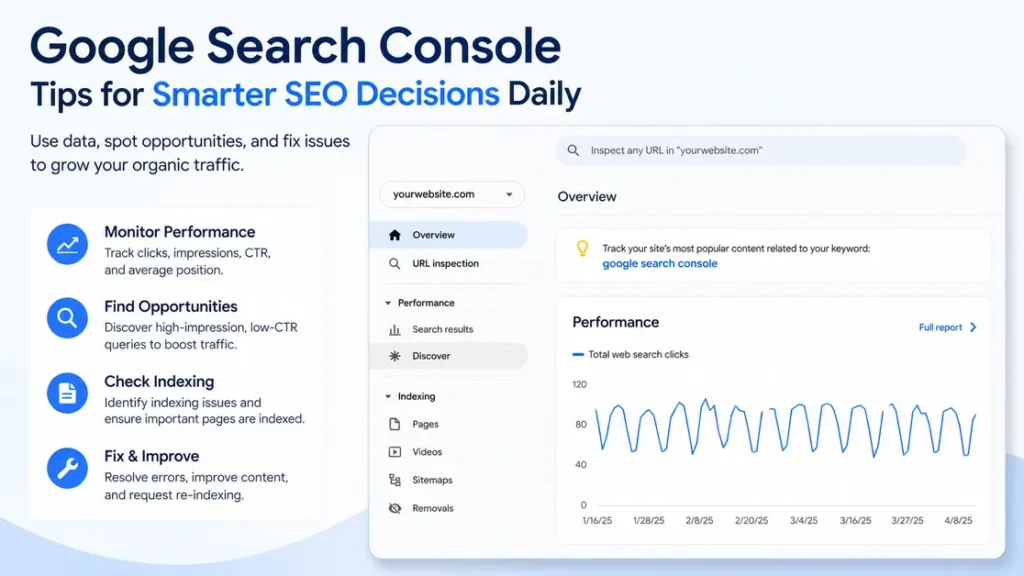
What does Google Search Console tell you?
Google Search Console shows how Google sees your site, what pages are getting impressions, which queries bring traffic, and where technical issues may be slowing you down. Used well, it helps you make smarter SEO decisions every day instead of guessing.
Here’s a simple example. A page can have 9,400 impressions, a position around 8.6, and only a 1.2% CTR. That usually points to a title or snippet problem, not a content problem. Small difference, big fix.
That is why Google Search Console is so useful. It turns SEO from a vague weekly check into a set of practical daily actions.
How Google Search Console helps you make better SEO decisions
The best way to use Google Search Console is to treat it like a decision tool, not a report you glance at once a month. A lot of site owners look at clicks and stop there. That misses the real signal.
Clicks tell you what already worked. Impressions tell you what Google is willing to show. Position tells you how close a page is to getting more traffic with a few smart changes.
Think about a product page that gets 2,100 impressions in 28 days but only 18 clicks. That is not a traffic problem alone. It may be a title problem, a snippet problem, or a page that ranks for the wrong search intent. Search Console gives you the clue. Your job is to act on it.
Also Read: Easy Tips to Make Your Website Faster and Easier to Use.
Which reports matter most for daily checks?
You do not need to inspect every report every day. That is a fast path to noise. Three areas matter most for day-to-day SEO work: Performance, Pages, and URL Inspection.
Performance report
This is the first place I look. It shows clicks, impressions, CTR, and average position.
A useful example: if a blog post got 600 impressions yesterday and 4 clicks, the CTR is under 1%. That may be fine for a broad query, but if the page sits at position 3 or 4, the snippet probably needs work.
Watch for these patterns:
- High impressions, low clicks
- Rising impressions, flat clicks
- Good position, poor CTR
- One query sending traffic while ten related queries are ignored
That last one matters more than people think. A page about “email marketing tips” might also appear for “newsletter ideas,” “welcome email examples,” and “email sequence structure.” If the page already ranks for those terms, add sections that match the real search behavior.
Also Read: Content Promotion Services to Increase Brand Visibility.
Pages report
The Pages report tells you which URLs are indexed, which ones are excluded, and why. That makes it one of the most practical gsc tips for daily work.
A small example: you publish 12 new pages in a week, but only 7 are indexed. That is not a content problem yet. It may be an internal linking problem, a crawl issue, or a weak sitemap setup.
Common checks here include:
- Crawled, currently not indexed
- Discovered, currently not indexed
- Duplicate without user-selected canonical
- Alternate page with proper canonical tag
If you see the same pattern again and again, fix the source. Do not keep publishing more pages and hope Google catches up later.
URL Inspection
URL Inspection is your quick answer tool. Paste a URL and see whether Google can index it, whether the page is live, and whether the last crawl picked up the latest changes.
A useful scenario: you update a page headline from “Best SEO Tools for Beginners” to “Best SEO Tools for Small Teams.” If the result does not show up after a few days, inspect the URL. Sometimes the page is fine. Sometimes Google has not re-crawled it yet. That is a very different problem.
Also Read: Website Maintenance and Performance Improvement Plans.
Which gsc tips are worth using every day?
Not every report deserves the same attention. The best gsc tips are the ones that help you choose what to change next.
1) Check pages with lots of impressions and weak CTR
This is the easiest win. Find pages with 1,000+ impressions in the last 28 days and CTR under 2%. Those pages already have visibility. They just need a better reason for people to click.
Example: a guide gets 3,500 impressions and 41 clicks. If the page rank is around 5 to 8, a sharper title and a cleaner meta description can make a real difference. Even moving CTR from 1.2% to 2.5% can double traffic without adding a single new page.
Good fixes here include:
- Tightening the title
- Matching the search intent more closely
- Adding numbers when the topic supports it
- Making the description more specific
2) Separate brand terms from non-brand terms
This one gets ignored far too often. Brand queries usually have high CTR and do not tell you much about content quality. Non-brand queries tell you what users actually want from your site.
Example: if 70% of clicks come from your brand name and only 30% from topic searches, the site may be too dependent on existing awareness. Search Console can show that clearly if you filter queries carefully.
That matters for planning. A site with strong brand traffic can survive weaker content. A site with little brand demand cannot.
Also Read: Paid Ad Management to Grow Targeted Website Leads Fast.
3) Look at page-level data before making changes
Site-wide averages can hide bad pages and make good pages look ordinary.
Say your site has 120 pages. Ten of them may bring in 80% of traffic. If one of those top pages slips from position 4 to 7, the total site report may barely move. But the page-level report will show the drop fast.
This is one of the biggest SEO decisions people get wrong. They optimize the site as a whole when the problem sits on one URL.
4) Use device and country filters before changing content
A page that works well on desktop may perform badly on mobile. A page that gets traffic in the US may struggle in the UK because spelling, terminology, or search intent is different.
Example: a page about “truck insurance” may perform well in the US but do nothing for visitors in other markets. That does not mean the page is weak. It means the query and audience are not the same.
Filtering by device and country helps you avoid bad fixes.
What should you do with rising impressions but weak clicks?
This is where Google Search Console becomes very practical. Rising impressions usually mean Google is testing your page more often. That is a good sign. It also means the page is close to a better outcome.
A simple process works well:
- Open Performance.
- Filter the page.
- Compare the last 7 days with the previous 7 days.
- Look at queries with impressions but low CTR.
- Rewrite the title or adjust the opening section.
Example: a page gets 1,800 impressions, sits between positions 6 and 9, and has a CTR of 0.8%. The content may already be good enough. The title could be too bland. “SEO Checklist” is weaker than “SEO Checklist for New Sites: 27 Tasks That Matter.”
That kind of change often matters more than adding another 500 words.
Also Read: Responsive Website Builds Focused on Speed and SEO.
What should you do when indexing looks messy?
Indexing issues can waste time fast. If Google is not indexing the right pages, your content never gets a fair shot.
Start with these checks:
- Are important pages in the sitemap?
- Are they linked from other pages?
- Is the canonical tag pointing to the right URL?
- Is the page thin, duplicated, or blocked?
- Did the page recently change a lot?
A real example: an ecommerce store publishes 50 category pages, but 14 show as “Crawled, currently not indexed.” The usual cause is not a mystery. It is often weak internal linking, duplicate filters, or pages that do not add enough value.
Do not keep pushing more URLs into the system before fixing the pattern. That creates more noise.
How do you use Search Console after publishing new content?
New content needs a different rhythm. The first few days are about crawl and visibility. Later, you care about query patterns and click quality.
A good post-publish routine looks like this:
- Day 1: request indexing if the page is important
- Day 2 to 7: check whether impressions start appearing
- Week 2: review queries and snippet quality
- Week 3 to 4: compare CTR against similar pages
Example: you publish a guide on “best running shoes for flat feet.” By week two, it appears for 15 related queries. That is useful. It tells you the page is earning a wider search footprint than the original topic alone.
That is how smarter SEO decisions happen. You stop guessing what Google understood, and you start reading the actual signals.
Also Read: Local SEO Services to Boost Nearby Customer Traffic.
What most site owners get wrong
A lot of people check Search Console only when traffic drops. That is too late for many small problems.
Others react to one bad day. Average position can move because of query mix, device mix, or seasonal change. One day of data is usually too thin to guide a rewrite.
The better move is to watch patterns over 7 to 28 days. Look for repeated signals. A page that slips one position for one day is noise. A page that loses impressions for two weeks is a real issue.
Another common mistake is changing too many things at once. If you rewrite the title, update the intro, add three internal links, and change the H1 on the same day, you will not know what helped. That makes future SEO decisions harder, not easier.
A simple daily Search Console routine
You do not need to spend an hour in the tool every day. Ten minutes is enough if you know what to look for.
Daily check
- Open Performance.
- Scan the last 24 hours or last 7 days.
- Look for sharp CTR drops on high-impression pages.
- Check whether a new page is getting impressions.
- Inspect any page you just updated.
Weekly check
- Review top pages and top queries.
- Compare branded and non-branded traffic.
- Look for pages stuck in the 5 to 15 position range.
- Check indexing issues that keep repeating.
- Pick one page to improve.
Example: if a page sits at position 11 for three weeks, that page is a good candidate for a refresh. Add a missing example, improve internal links, and tighten the title. Pages in that zone are often close enough to move with a modest update.
How to use Search Console for long-term SEO decisions
Daily checks are useful, but the bigger value comes from pattern recognition. Over time, Search Console tells you which kinds of content deserve more work, which topics have search demand, and which pages need help before they stall.
For example, if every how-to guide on your site gets impressions quickly but has weak CTR, your titles may be too plain. If your comparison pages rank well but do not hold position, the content may need stronger proof, clearer structure, or better internal linking.
That is the real power of Google Search Console. It helps you stop making blanket SEO choices and start making page-specific ones.
Also Read: Technical SEO Fixes for Faster Site Indexing and Crawling.
FAQ
How often should I check Google Search Console?
Once a day is enough for active sites, and once or twice a week works for smaller sites. A 10-minute review is usually enough to spot new issues or quick wins.
What is the most useful report in Google Search Console?
For most site owners, the Performance report is the most useful. It shows clicks, impressions, CTR, and position, which makes it the best starting point for SEO decisions.
Why does average position change so much?
Average position moves because Google tests different queries, devices, and locations. A small swing does not always mean a real ranking problem, so watch longer patterns before changing content.
What CTR is good in Search Console?
There is no single good CTR number. A page in position 1 should usually earn more clicks than a page in position 8, so the right benchmark depends on the query and ranking position.
Can Google Search Console improve rankings by itself?
No. It does not change rankings directly. It gives you the data you need to make better updates, which can lead to better rankings over time.
What should I fix first if a page has impressions but no clicks?
Start with the title and snippet. If the page already shows up often but gets little traffic, the search result may not be specific or useful enough to earn the click.
Conclusion
Use the data to pick one clear fix at a time. That habit makes SEO cleaner, faster, and far less random.
For more useful articles, visit my website: HighSoftware99.